Online Technology Tutoring
Online Mobile Development Tutoring
Build your first app from the screen at home, walked through it by a tutor who joins you on a live video call. This online mobile development tutoring carries you from an opening Flutter widget, past arranging screens in React Native, right up to installing an app on a physical handset. The tutor is matched to your aim, be it a campus assignment, a portfolio for job hunting, or a personal app idea. Timetables track your household routine between 06:00 and 23:00, and pricing opens at Rp 102,000 per hour.




180+
tutors
2,600+
students
4.9
rating · 856 reviews
60+
cities
What is Online Mobile Development Tutoring?
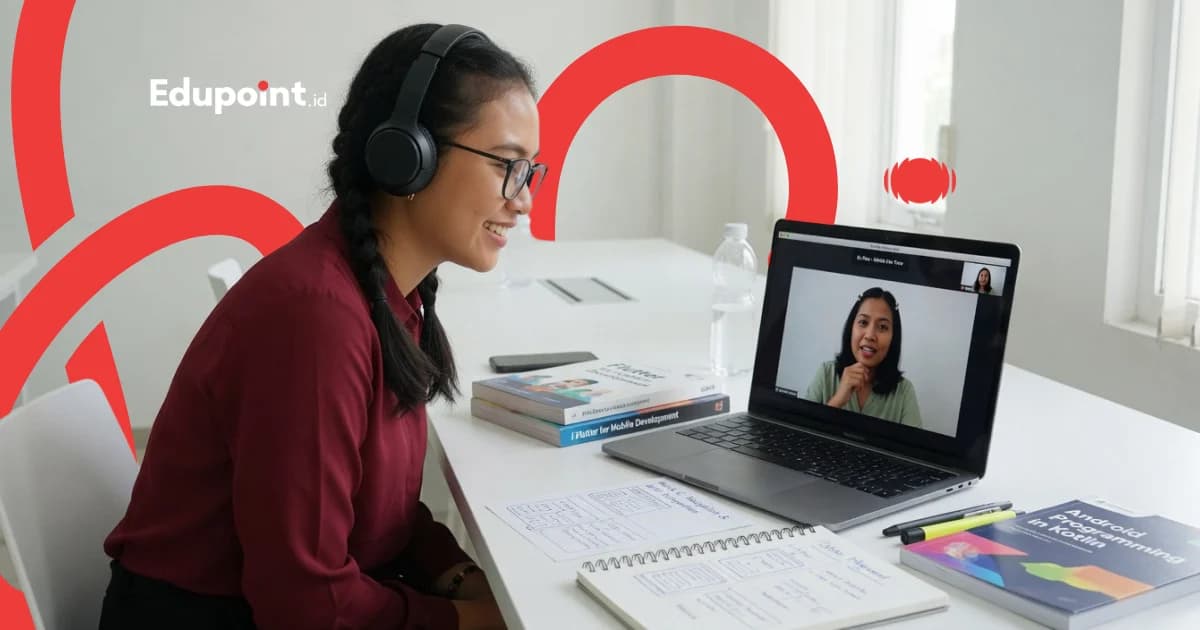
Online mobile development tutoring is one-to-one private coaching for assembling Android and iOS apps, held live over a video call. Tutor and learner share a screen and write code together in real time, then run it on an emulator or a real phone in the same meeting. The material reaches from programming basics to frameworks like Flutter and React Native.
- Live one-on-one guidance over Zoom or Google Meet
- EduPoint co-learning modules opened side by side on screen and replayable
- Learn Flutter, React Native, Kotlin, or Swift to match your target
- Every stage produces a real app you can actually run
- Top tutors from leading campuses reach learners in any city
- Recorded sessions are saved for review, with no travel cost
Online Mobile Development Learning Stages
A journey from your first screen to an app ready to publish, matched to your readiness
Beginner
First Screen (0-2 months)An introduction for those who have never touched app code. The tutor guides you through installing the toolkit, understanding project structure, and running your first working screen on an emulator during the opening session.
Subjects:
Dart or JavaScript LogicMobile Project StructureBasic Widgets and Components
Focus Areas:
- Setting up the workspace with the tutor
- Composing a simple screen layout
- Understanding data flow between screens
- Running the app on an emulator
Intermediate
A Living App (2-5 months)Learners begin building apps with multiple screens, responsive buttons, and stored data. The tutor helps connect the interface with the logic behind it.
Subjects:
Screen NavigationBasic State ManagementLocal Storage
Focus Areas:
- Managing page transitions cleanly
- Keeping data consistent as screens change
- Saving user notes on the device
- Building validated forms
Advanced
Connected to the World (5-9 months)The app starts pulling data from the internet, recognising users, and showing content that stays fresh. Ideal for preparing a portfolio for technology job applications.
Subjects:
API and REST IntegrationUser AuthenticationAdvanced State Management
Focus Areas:
- Fetching data from a server and displaying it
- Handling login and user sessions
- Gracefully managing failed connections
- Assembling a three-app portfolio
Specialist
Ready to Publish (9 months onward)Focus turns to app quality, testing on real devices, and the steps to publish to the app stores. Learners prepare for job interviews or for releasing their own product.
Subjects:
Testing and Bug FixingPerformance OptimisationPlay Store and App Store Release
Focus Areas:
- Testing the app across screen sizes
- Reducing memory and battery use
- Preparing release files and app signing
- Writing technical notes for interviews
Modules Opened Together on Screen
Choose the path that suits your app's goal; every module is stored in the EduPoint app for you to revisit
Module order and depth are set by the tutor to match your pace
Mobile Programming Foundations
The logic and language that hold up every app, walked through slowly with your tutor
- Variables and Data Types
- Conditionals and Loops
- Functions and Modularity
- Asynchronous Concepts
- +2 more
Flutter and Dart
Building Android and iOS interfaces from a single codebase with Flutter
- Stateless and Stateful Widgets
- Responsive Layouts
- Navigation and Routes
- Provider and Riverpod
- +2 more
React Native
A JavaScript-based cross-platform option for those already at home on the web
- Components and Props
- Hooks and State
- React Navigation
- Styling and Flexbox
- +2 more
Data and Connectivity
Connecting the app to servers, databases, and cloud services
- HTTP and REST Requests
- Firebase and Firestore
- User Authentication
- Local Storage
- +2 more
Release and Maintenance
Preparing the app to be publish-worthy and easy to maintain
- Testing on Real Devices
- Size and Performance Optimisation
- Release Files and Signing
- Play Store Publishing
- +2 more
Who It Is For
Who Is This Online Mobile Development Tutoring For?
From students preparing a portfolio to workers moving into technology, every learner has their own goal
High School Students
Preparing an app portfolio to apply for technology majors, joining competitions, or strengthening overseas university files.
Recommended:
University PortfolioApp CompetitionCoding Basics
Technology Students
A companion to mobile programming courses, final projects, or internship preparation at technology companies.
Recommended:
CourseworkFinal ProjectInternship Prep
Career Switchers
Professionals from other fields who want to enter the tech industry through the mobile app developer route.
Recommended:
Career ChangeWork PortfolioInterview Prep
Learners Where Local Tutors Are Scarce
Learners in any city who struggle to find a nearby mobile development tutor can study with a top-campus tutor over the screen.
Recommended:
Remote LearningTop-Campus TutorNo Travel
People With an App Idea
Anyone with an app idea who wants to build it themselves, from a small business to a personal project.
Recommended:
Personal ProjectBusiness AppIdea Prototype
Featured
The EduPoint Learning System: Coding Progress, Recorded and Reported
Every online mobile development meeting is recorded then condensed into a report parents can skim easily, with no need to sit through the whole class.
Report Features
Modules opened together on screen
Tutor and learner open the same module live and mark the exact line of code under discussion, so an explanation about a widget or state never simply slips by.
Recorded sessions to replay
Live sessions are stored in the EduPoint app, so a learner can revisit how to connect an API or fix an error whenever they need to go over it again.
A record per skill
Each mobile skill carries its own note of understanding, from screen layout to data integration, showing what is solid and what still needs another pass.
Regular reports to parents
Parents receive a steady summary of their child's progress, complete with tutor notes and the plan for the next session's material.
Sample Progress Report
Fikri, mahasiswa
University, 4th Semester • First Learning Term
61%
Overall Progress
Sessions Completed
14 of 24
Next Milestone
Publishing the first Flutter app to the Google Play Store
May 1, 2001
Flutter and Widget Basics
On Track86/90
Comfortable composing layouts; next is tidying up stateful widget usage.
State Management
Improving72/85
Understanding of Provider improved after dissecting a simple notes app.
API Integration
Improving68/82
Starting to fetch data from a server; next focus is handling failed connections.
App Publishing
Needs Attention60/80
Just getting to know release files; a Play Store publishing walkthrough is planned.
Common Hurdles
Obstacles in Learning Mobile Development Online and the Way Through
Learning to build apps from home has its own challenges; our online tutors are used to walking learners past them
Confused by heavy toolkits to install
Why it happens
Setting up Android Studio, the SDK, and an emulator often makes beginners give up before writing a single line of code.
How we fix it
The tutor walks through the installation via screen sharing and suggests Expo or a lighter emulator when the learner's device is limited.
Code runs on the tutor's screen but fails on the learner's
Why it happens
Differences in framework or operating system version can make the same result appear differently on two devices.
How we fix it
Because the session is live, the tutor sees the learner's screen directly, traces the version in use, and aligns it within the same session.
Hard to focus while learning alone at home
Why it happens
Without classmates, a learner is easily distracted and can lose the thread when the material gets intricate.
How we fix it
The one-on-one format keeps attention steady, and the co-learning module sets a small target for each session.
Afraid to read long error messages
Why it happens
Rows of red text in the console feel intimidating and often freeze a learner who does not know where to begin.
How we fix it
The tutor reads the error line by line together, turning it into a clue, until fixing a bug feels like an ordinary habit.
The app idea is there, but not the order to build it
Why it happens
Seeing a whole app feels daunting for a beginner who does not yet know which part to work on first.
How we fix it
The tutor breaks the idea into small screens and features, then arranges them into a work map you can chip away at each meeting.
Each of these hurdles is discussed openly in the first session so learning feels light from the very first step
Why Us
What Makes Our Online Mobile Development Tutoring Feel Different
Six things that accompany your journey from a blank screen to an app installed on a phone
A Real Tutor, Not a One-Way Video
You learn alongside a tutor genuinely present on screen, ready to answer questions and see the very code you are writing.
EduPoint Co-Learning Modules
More than a thousand active modules open together with the tutor on screen, stored in the app so you can revisit them after the session ends.
Top-Campus Tutors, No Distance Limit
The best students and alumni can teach learners in any city, so access to a good tutor no longer depends on where you live.
Learning by Building Real Apps
Every stage produces an app that truly runs, from a simple notes app to one connected to a server.
Progress Recorded and Reported
Sessions are stored and skill development is logged, then summarised into regular reports parents can read easily.
Savings With No Travel Cost
Learning from home removes travel expenses, and the schedule can follow the family's free time within 06:00 to 23:00.
The Online Mobile Development Tutors Beside You
Learn from the best students and alumni of leading campuses who are used to building apps
Tutor Qualifications
- Background in Computer Science, Information Systems, or Informatics Engineering
- Used to building mobile apps with Flutter or React Native
- Able to explain intricate concepts in plain language
- Patient with learners new to coding
- Passed EduPoint's selection and teaching training
Dara D.
Information Systems, University of Indonesia
Tidy screen layouts“Dara has learners arrange app screens neatly from the start, so adding new features later feels easy and never turns messy.”
Ato A.
Informatics Engineering, Universitas Brawijaya
Flutter from one codebase“Ato loves showing how one Flutter codebase runs on both Android and iOS, so learners feel their effort pays off twice over.”
Edo E.
Information Systems, Telkom University
Connecting apps to data“Edo guides learners to pull data from a server and show it on screen, the moment their app truly starts to feel alive.”
Gigih G.
Informatics, Bandung State Polytechnic
State management made clear“Gigih dissects state management through small example apps, so learners know where every piece of data goes when the screen changes.”

Raihan R.
Informatics Engineering, Sultan Agung Islamic University
React Native for the web-savvy“Raihan bridges learners from the web into React Native, using the JavaScript they already know as a foothold.”

Farah F.
Informatics, University of Muhammadiyah Malang
Patient with true beginners“Farah is used to guiding learners opening a code editor for the first time, breaking foreign terms into examples easy to picture.”
Testimonials
Stories From Online Mobile Development Learners
University students, high schoolers, and career switchers share their first steps building apps with our online tutors
Online Mobile Development Tutoring Fees
Learn to build apps on an hourly rate that stays clear from the outset. A meeting runs sixty, ninety, or one hundred twenty minutes long, and you decide the count of monthly sessions yourself, between 4 and 28. The complete total shows plainly on the sign-up page.
Starting from
Rp 102.000 / hour
Final price is set at registration.
This is the lowest hourly rate, derived from the 28-session monthly plan at 120 minutes per session. Per-session prices (60, 90, or 120 minutes) appear in the format options above.
Register & Get a QuoteFlexible payment — QRIS, Virtual Account, Alfamart, Indomaret, transfer & e-wallets.
The online rate stays identical for learners in any city. Paying works through QRIS or an e-wallet, a debit or credit card, a Virtual Account, a bank transfer, right down to an Alfamart or Indomaret till.
How Online Tutoring Follows Your Family's Rhythm
Live Pair Coding
Tutor and learner write code together on one screen, so every error is read and fixed on the spot rather than piling up for later.
Pace That Follows the Learner
Material moves forward once the learner understands, and the tutor revisits shaky parts without ever making the learner feel left behind.
More Practice Than Theory
Most of the time goes into building a real app, with theory woven in exactly when it is needed.
Flexible Scheduling Within 06:00 to 23:00
Sessions are arranged around the family's free time inside service hours, and the recording remains available to replay another time.
Why Private Online Tutoring Keeps You Company More Than a Video Class
An honest comparison with other ways to learn mobile development, without naming any provider
| Feature | EduPoint Private Tutoring | Recorded Video Class | Group Online Class | Self-Taught |
|---|---|---|---|---|
| A live tutor who sees your screen | ||||
| Material tuned per learner | ||||
| Errors fixed on the spot | ||||
| Modules opened together on screen | ||||
| Sessions you can replay | ||||
| Progress reported to parents | ||||
| Flexible schedule around the family |
Online Mobile Development Tutoring Availability
Online Tutoring
Online WorldwideOnline mobile development tutoring is available for learners across Indonesia and abroad, reaching top-campus tutors with no distance limit.
- Session recordings stored in the app
- Screen sharing and live pair coding
- Co-learning modules you can revisit
- WhatsApp support between sessions
Student Achievements
A Learner's Journey to Their First App
Real stories drawn from their online sessions with EduPoint tutors
Success
From Never Opening a Code Editor to an App on the Play Store
Bagas R.
Before
Had never written code
After
First app live on the Play Store
Self-published
9 months
“I started from truly zero. My tutor walked with me from installing the toolkit to pressing the publish button. Seeing my own app become something others could download felt incredible.”
Success
Preparing a Portfolio to Apply for Tech Jobs
Intan W.
Before
One university project
After
Three apps in the portfolio
Portfolio ready to apply
6 months
“As a fresh graduate I needed a convincing portfolio. My tutor helped me build three apps with API integration and explained each technical decision so I would be ready in interviews.”
Success
Learning to Build Apps While Studying in a Small Town
Yoga S.
Before
Hard to find a nearby tutor
After
Building an app every week
Consistent learning
5 months
“There was nowhere to learn mobile development in my town. Through this online program I am taught by a student from a leading campus without moving cities, and the schedule fits around my classes.”
FAQ
Frequently Asked Questions About Online Mobile Development Tutoring
Yes. Our online mobile development tutoring welcomes beginners who have never written a single line of code. The tutor starts from installing the toolkit and introducing basic logic, then builds understanding step by step until you can run your first app on an emulator.
Live classes run on Zoom or Google Meet, or another video call the family is comfortable with. The lessons and their recordings stay inside the EduPoint app. In all honesty, EduPoint builds no video-call system of its own and leans on platforms you already know.
For true beginners, many tutors suggest Flutter because a single codebase runs on both Android and iOS. If you are already comfortable with JavaScript and the web, React Native may feel easier. The tutor will help choose the path that best fits your app's goal.
It depends on your goal and how intensively you study. For a simple running app, 2 to 3 months with lessons twice a week is usually enough. For a portfolio ready for job applications, it typically takes 6 to 12 months of consistent learning with a tutor.
Yes. Every online mobile development session is stored and can be replayed in the EduPoint app. If you forget how to connect the app to a server or fix a particular bug, you can simply reopen the tutor's recorded explanation whenever you need it.
Guides & Tips
Supporting articles to help you decide and maximize learning outcomes.
Android Mobile Development Roadmap: 5 Stages From Zero to Launch
A study map that arranges Android material in order, from your first Kotlin syntax to an app that goes live on Google Play.
How to Choose the Right Mobile Development Framework for Beginners
A decision guide for picking your entry point into mobile development, comparing Flutter, React Native, and Kotlin Native based on your goals, target platform, and the language you already know.
Other Online Programs That May Suit You
Browse the EduPoint online tutoring pillar plus other technology programmes families often take together with mobile development.
Time for Your First App to Be Born From Your Screen at Home
Let's talk first, for free: we check your starting point and help you pick the mobile development path that makes the most sense for your goal
Free consultationTutor chosen for your goalEduPoint co-learning modulesTutor replacement guarantee